
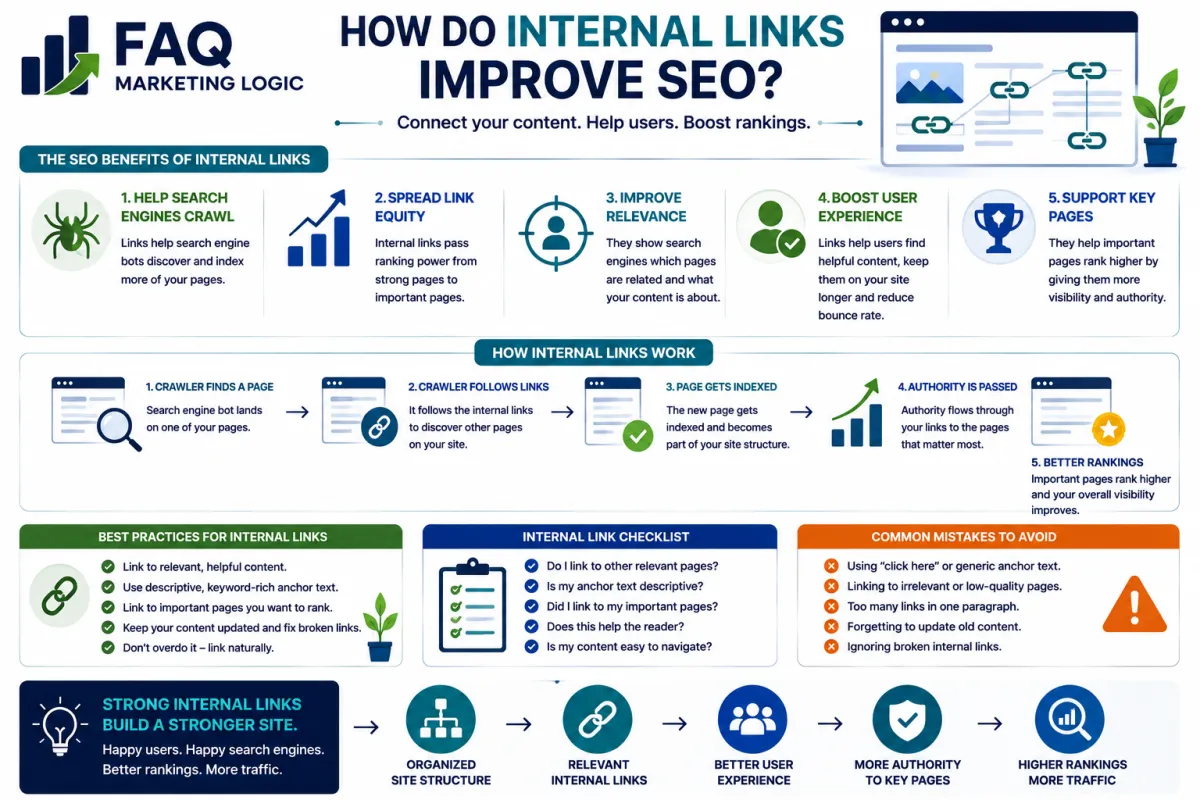
How Do Internal Links Improve SEO?
TL;DR
Internal links improve SEO by connecting related pages, helping search engines discover content, showing how topics fit together, and guiding visitors towards useful next information.
They can also help distribute authority and attention across your website.
The goal isn't to add as many links as possible.
It's to build a logical network where important pages are easy to find and related content supports each other.
IN SHORT
Internal links can help SEO by:
Helping search engines discover pages.
Connecting related topics.
Showing which pages are important.
Providing context about linked content.
Preventing valuable pages from becoming isolated.
Helping visitors explore your website.
Supporting pillar and topic-cluster structures.
Good internal linking follows meaning.
Page A → Relevant Page B → Logical Next Step
Not:
Page A → Random Page → Random Page → Random Page
REAL TALK
Internal linking sounds boring.
There are no exciting traffic hacks.
No secret algorithm loopholes.
No instant ranking promises.
It's simply good website organisation.
And that's exactly why it's so useful.
If you've spent months creating valuable articles but haven't properly connected them, you're making both visitors and search engines work harder than necessary.
You don't need hundreds of links on every page.
You need the right connections.
Key Definition
An internal link is a hyperlink from one page on a website to another page on the same website.
For example:
An article about email subject lines linking to another article about email engagement is an internal link when both pages are on the same domain.
Internal links differ from external links, which point from your website to another domain.
They can appear within:
Article content.
Navigation menus.
Pillar pages.
Category pages.
Related-content sections.
Breadcrumbs.
Calls-to-action.
Each type can help visitors navigate the website, although contextual links within relevant content can be particularly useful for explaining relationships between pages.
Internal Links Help Search Engines Discover Pages
Search engines crawl websites partly by following links.
When a crawler visits a known page and encounters a link to another page, it has found another potential route to that URL.
Imagine you publish a new article.
You add it to:
The relevant pillar page.
One existing related article.
Your normal site structure.
The new article now has several discovery routes.
Compare that with publishing the same article and never linking to it.
The page exists.
But you've made it harder to encounter naturally.
Internal links help turn individual URLs into a connected website.
Internal Links Help Explain Relationships
Links aren't only pathways.
They also provide context.
Suppose your Traffic pillar contains articles about:
Website traffic.
Search engine discovery.
Ranking content.
Topical authority.
Internal linking.
Updating old content.
Connecting those articles tells both readers and search engines:
These subjects belong together.
Over time, those relationships create a clearer picture of what your website covers.
This is particularly useful when building topic clusters around broader pillar subjects.
Internal Links Support Topical Authority
Topical authority isn't created simply by publishing lots of articles containing similar keywords.
The content needs structure.
Imagine your website has a broad guide to website traffic.
That cornerstone links to detailed articles covering:
Traffic sources.
Search discovery.
SEO.
GEO.
Topical authority.
Content optimisation.
Those supporting articles also connect to one another where relevant.
You now have a network of information around a central subject.
The structure becomes:
Pillar → Subtopic → Supporting Question → Related Question
That's much more useful than twenty disconnected posts that happen to mention website traffic.
Internal Links Can Signal Page Importance
Not every page on your website has equal importance.
Some pages are foundational.
Others answer narrow supporting questions.
Your internal linking structure can help reflect that hierarchy.
If dozens of relevant pages naturally point towards an important cornerstone guide, that page clearly occupies a central position within your site structure.
Likewise, a page that receives no internal links may appear relatively isolated.
This doesn't mean you should manufacture hundreds of links to whatever page you want to rank.
It means important pages should naturally sit at important points within your site's architecture.
Anchor Text Provides Context
Anchor text is the clickable wording used for a link.
For example:
Learn more about building topical authority
is more descriptive than:
Click here
Descriptive anchor text helps readers understand what they'll find before following the link.
It can also provide search engines with context about the destination page.
Keep it natural.
You don't need to force an exact keyword into every internal link.
If the wording clearly describes the destination, it's doing its job.
Internal Links Improve The Reader Journey
SEO isn't only about search-engine crawlers.
A useful internal link helps a real visitor continue their journey.
Someone reading:
How Do Search Engines Discover New Content?
might naturally want to know:
How Do Internal Links Improve SEO?
That's a useful connection.
Likewise, someone learning about internal linking may next need information about topical authority.
Good internal links anticipate those questions.
Think:
"What is this person likely to need next?"
rather than:
"Where can I squeeze another link into this paragraph?"
Pillar Pages Make Internal Linking Easier
Pillar pages provide a central structure for related content.
For example, a Traffic pillar might organise articles into:
Discovery
AI Search
Authority
Optimisation
Each section points visitors towards detailed supporting articles.
Those supporting articles can then link:
Back to the pillar.
To one or two closely related articles.
Forward to the next logical subject.
This creates controlled pathways rather than uncontrolled link clutter.
A strong pillar becomes both:
A resource for the reader
and:
A map of the topic
That's one reason structured content architecture becomes increasingly valuable as a website grows.
Internal Links Can Help Older Content
Internal linking isn't only something to think about when publishing new pages.
New content can create opportunities to strengthen older content too.
Suppose you publish a detailed new article about internal linking.
You may already have older posts discussing:
Topical authority.
Search discovery.
Content optimisation.
Go back and look for places where linking to the new article genuinely improves those pages.
Now the relationship works in both directions.
Old content → New content
and where appropriate:
New content → Old content
This helps keep your content library connected as it expands.
Avoid Orphan Content
An orphan page has no internal links pointing to it from elsewhere on the website.
Important content shouldn't normally be left in that position.
A page might still be discoverable through a sitemap or an external link, but it isn't properly integrated into your site architecture.
Every important article should have a clear answer to:
"Where does this page belong?"
If you can't answer that, the problem may be bigger than internal linking.
The article itself may not fit your site's topical structure.
Don't Overdo It
If internal links help SEO, adding more must help more.
Right?
Not necessarily.
A page containing excessive links can become distracting and difficult to use.
Links should have a reason to exist.
Before adding one, ask:
Is the destination relevant?
Does it help the reader?
Does it clarify the topic?
Is this a logical next step?
If the answer is no, you probably don't need the link.
Internal linking should create clarity.
Not clutter.
What About Linking To The Same Page Repeatedly?
Usually, there is little reason to repeatedly link to the same destination throughout a short article.
One well-placed contextual link may be enough.
You can also include the destination in a structured Related Articles or Next Step section when appropriate.
The aim is not to hit a link quota.
It's to create useful pathways.
Practical Example
Imagine a website has four Traffic articles:
Article 1: The Beginner's Guide To Website Traffic
Article 2: How Do Search Engines Discover New Content?
Article 3: What Makes Content Worth Ranking?
Article 4: How Do Internal Links Improve SEO?
You could leave them as four independent pages.
Or you could create this progression:
Beginner's Guide
↓
Search Discovery
↓
Content Quality
↓
Internal Linking
Each article can also link back to the Traffic pillar and sideways to closely related resources when useful.
Now the reader can move through the subject logically.
The pages aren't competing to exist independently.
They're working together as a knowledge system.
That's the real power of internal linking.
Common Mistakes
Mistake: Adding internal links purely to manipulate rankings.
Fix: Link pages because the relationship is genuinely useful and relevant.
Mistake: Using vague anchor text such as "click here" everywhere.
Fix: Use wording that helps readers understand the destination.
Mistake: Linking every possible keyword.
Fix: Prioritise the strongest contextual relationships.
Mistake: Forgetting older articles when publishing something new.
Fix: Review relevant existing content for sensible links to the new page.
Mistake: Creating orphan pages.
Fix: Give every important article a clear place within the site's structure.
Mistake: Linking only towards sales pages.
Fix: Use internal links to help people learn and navigate as well as move towards commercial next steps.
FAQ QUICK FIX
Improve your internal linking with this simple process:
1. Identify your pillar pages.
Know the central pages for your main subjects.
2. Assign every supporting article to a pillar.
Make sure each page has a logical home.
3. Link from the pillar to the supporting article.
Create a clear route into the content.
4. Add relevant sibling links.
Connect closely related questions where doing so helps the reader.
5. Use descriptive anchor text.
Make the destination understandable before someone clicks.
6. Review older content.
Look for opportunities to link established pages to newer resources.
7. Check for orphan pages.
Make sure valuable content isn't sitting alone.
8. Keep the structure useful.
Don't add links simply to increase the number of links on the page.
FAQ
Q: How many internal links should a page have?
There isn't one correct number. Use enough links to help visitors navigate and establish meaningful relationships without making the page cluttered or distracting.
Q: Should I use exact-match keywords as anchor text?
Not every time. Descriptive, natural anchor text is more useful than repeatedly forcing the same keyword phrase.
Q: Should every blog post link to a pillar page?
If you're using a pillar-and-cluster architecture, linking supporting content into that structure can help maintain clear relationships between the broader topic and individual articles.
Q: Can internal links help a new page get indexed?
They can help search engines discover and crawl new pages. Indexing itself isn't guaranteed simply because a page has internal links.
Q: Should I go back and add links to old posts?
Yes, when newer content provides a useful destination for readers of an older article. Updating older pages with relevant internal links can strengthen the overall content network.
Q: Can too many internal links hurt a page?
Excessive or irrelevant linking can make content harder to use and dilute the purpose of the links. Focus on usefulness rather than hitting a particular number.
TRY THIS TODAY
Choose one important article on your website.
Now ask:
"What pages point towards this article?"
Then ask:
"Where can someone logically go after reading it?"
If you struggle to answer either question, the page may not be properly connected.
Add the links that improve the journey.
Ignore the ones that don't.
RELATED ARTICLES
→ How Do Search Engines Discover New Content?
→ How Do I Build Topical Authority?
→ What Makes Content Worth Ranking?
QUICK RECAP
Internal links help by:
Creating discovery paths.
Connecting related content.
Providing context.
Supporting topical structure.
Highlighting important pages.
Preventing orphan content.
Helping visitors continue their journey.
The goal isn't maximum linking.
It's meaningful linking.
Think of your website as a connected body of knowledge rather than a collection of URLs.
Every useful internal link strengthens that connection.
NEXT STEP
Once your content is properly connected, the next opportunity is to look at the pages you've already published and decide which deserve improvement rather than continually creating something new.
Read: