
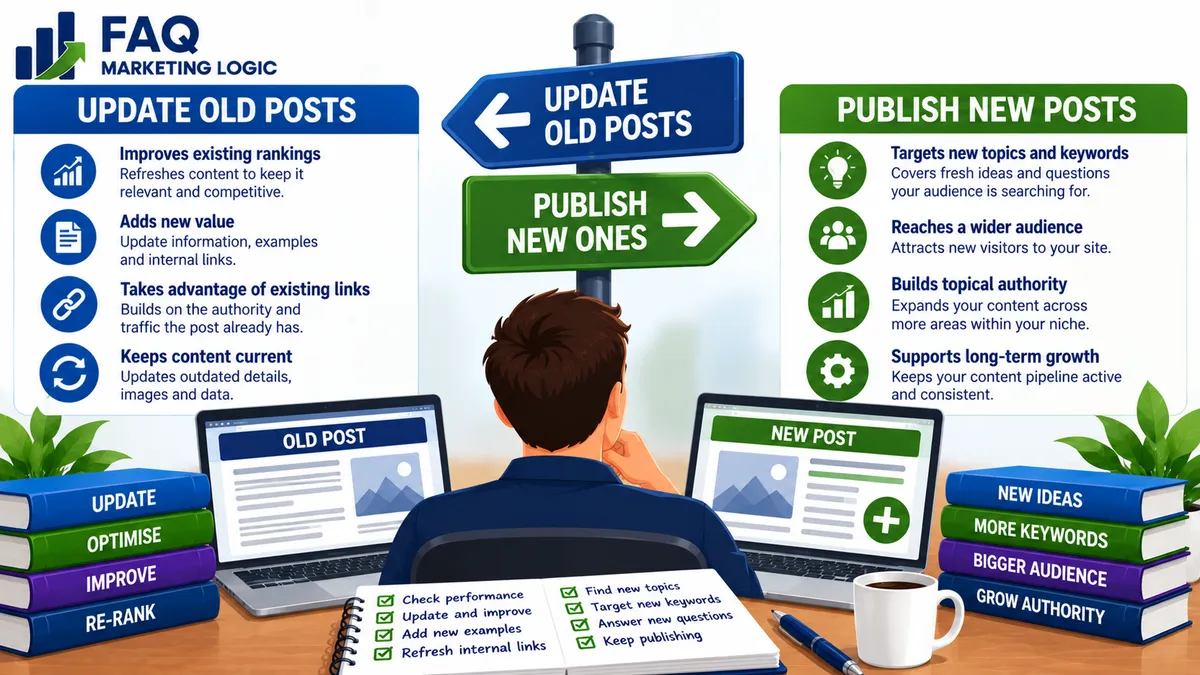
Should I Update Old Posts or Publish New Ones?
TL;DR
You shouldn't automatically choose between updating old posts and publishing new ones. They do different jobs.
Publish new content when you need to answer questions your website doesn't already cover. Update existing posts when they're already being discovered, but could be more complete, accurate or useful.
A sensible content strategy usually does both.
The important part is knowing when an existing page has earned more attention and when a genuinely new page is needed.
IN SHORT
Publishing new content feels productive.
Every new article gives your website another page that could potentially appear in search results.
But there's a problem.
If you continually publish new posts while ignoring the pages Google is already discovering, you can end up with a growing website full of underdeveloped content.
Sometimes the biggest opportunity isn't the next article.
It's an article you published months ago that's already receiving impressions but isn't yet performing as strongly as it could.
That's when updating old content becomes particularly interesting.
REAL TALK
More content doesn't automatically mean more traffic.
You could publish 100 articles and discover that most of your search visibility comes from ten of them.
If those ten pages are already showing signs of life, continually ignoring them while creating another 100 articles may not be the best use of your time.
Equally, you don't want to spend every week rewriting the same handful of pages.
A healthy website needs breadth and depth.
New posts create breadth.
Strategic updates create depth.
The trick is knowing which one your site needs next.
Key Definition: What Is A Content Update?
A content update means improving an existing page while keeping the same underlying search intent and, normally, the same URL.
An update might involve:
Adding missing information
Improving explanations
Answering additional relevant questions
Updating outdated facts
Improving examples
Strengthening headings
Making the article easier to navigate
Improving internal links
Removing obsolete material
Clarifying confusing sections
Improving the title or description where appropriate
A genuine update isn't simply changing a few words so the publication date looks newer.
The page should become meaningfully more useful.
When Should You Update An Old Post?
There are several useful signals.
The Post Is Already Getting Search Impressions
This is one of the most interesting situations.
Suppose an article receives hundreds of Google impressions but very few clicks.
Google is already discovering and testing the page.
That doesn't guarantee an update will improve its rankings, but it gives you useful evidence that the topic has search visibility.
Look at:
Queries generating impressions
Average position
Clicks
CTR
Changes over time
Then compare those searches with the content itself.
You may discover that people are searching for questions your article only answers briefly.
That can show you exactly where the page could be strengthened.
The Post Is Ranking Just Outside Stronger Positions
Imagine an article regularly appears around positions 8–20 for relevant searches.
That's very different from a page Google rarely displays at all.
The article may already have:
Relevant search intent
Some authority
Useful internal links
Topical relevance
Search history
Improving that existing page may sometimes be more productive than creating another article targeting almost the same subject.
Don't assume you need a new URL whenever you discover another keyword.
First ask:
Does the existing article already satisfy the same underlying search intent?
If it does, strengthening the existing page may be the cleaner option.
The Information Has Become Outdated
Some articles age naturally.
You may need to update:
Statistics
Prices
Screenshots
Tools
Platform instructions
Product details
Regulations
Examples
External links
Recommended processes
Outdated information can reduce usefulness even when the basic article remains sound.
You don't necessarily need to rewrite everything.
Update the parts that have genuinely changed.
The Original Article Is Too Thin
Perhaps you published a useful answer when the site was new.
At the time, 700 words answered the basic question.
Months later, Search Console shows that Google is displaying the page for several related searches.
Now you can see that the subject deserves more depth.
Rather than creating several overlapping posts, you might expand the existing article with:
Better explanations
Additional questions
Examples
Common mistakes
Practical steps
Relevant FAQs
The original page keeps its purpose.
It simply becomes a better answer.
The Search Intent Hasn't Changed, But Your Understanding Has
Your knowledge of a subject develops.
So does your understanding of your audience.
An article you wrote a year ago may still target exactly the right question, but you can now explain the answer much better.
That's a legitimate reason to update it.
You may have learned:
Which parts confuse readers
Which questions occur repeatedly
Which examples work best
Which advice needs qualification
Which steps deserve more explanation
The URL doesn't need to change simply because your answer has improved.
When Should You Publish A New Post Instead?
Updating isn't always the answer.
Publish a new article when you're addressing a genuinely different question or search intent.
Suppose you already have:
How Do Internal Links Improve SEO?
You then discover people asking:
How Many Internal Links Should A Blog Post Have?
Those questions are closely related.
But they aren't necessarily identical.
The first asks why internal linking matters.
The second asks how many links to use.
If each question deserves a substantial standalone answer, two pages can make sense.
The key is ensuring each page has a clear purpose.
Don't Create New Posts Just For Keyword Variations
This is where content libraries can become messy.
Imagine creating separate articles for:
How Do I Write Better Emails?
How Can I Improve My Email Writing?
How Do I Make My Emails Better?
How Can I Write More Effective Emails?
Those phrases are different.
But the reader may be asking essentially the same question.
Creating four weak pages can result in unnecessary overlap.
A stronger approach may be one comprehensive article capable of naturally addressing several related searches.
Think in terms of questions and intent, not simply keyword variations.
What Is Content Cannibalisation?
Content cannibalisation can occur when multiple pages on the same website compete for very similar search intent.
It doesn't mean two articles can never discuss related subjects.
A well-developed website naturally contains connected pages.
The problem arises when you struggle to explain why both pages need to exist.
For example:
What Makes A Landing Page Convert?
and
How Do I Increase Landing Page Conversions?
can coexist if one explains the principles behind conversion and the other focuses on practical optimisation.
But if both pages contain essentially the same answer, the distinction becomes weak.
Before publishing a new article, ask:
What will this page answer that my existing page doesn't?
If you can't give a clear answer, consider updating the existing page instead.
Use Search Console To Decide What To Update
Google Search Console can make updating much less subjective.
Instead of guessing which articles deserve attention, look for pages with signs of opportunity.
For example:
Increasing impressions
Relevant queries
Positions approaching page one
High impressions but weak CTR
Several related search queries
Pages whose visibility has started declining
Then inspect the page.
Search Console tells you what Google is already associating with it.
Your job is to decide whether the content deserves strengthening.
Don't Chase Average Position Alone
Average position is useful, but it needs context.
A page might have an average position of 15 because:
It ranks 6th for one query
18th for another
40th for another
Likewise, a page with a relatively poor overall average might have one highly promising query.
Look at:
Individual queries
Impressions
Clicks
Trend
Relevance
Don't rewrite a page simply because one number looks disappointing.
Use the data to investigate.
What About Posts Already Ranking Well?
Be careful.
If an article is already performing strongly and the information remains accurate, you don't need to rewrite it simply because it hasn't been touched recently.
An unnecessary major rewrite can alter:
Search intent
Heading structure
Important wording
Internal links
Useful sections
Updates should have a reason.
If a page is performing well, you might simply check:
Accuracy
Broken links
Product references
Internal links
Outdated examples
Then leave the core article alone.
Don't fix something merely because it's old.
Should I Change The URL When Updating A Post?
Usually not if the article is still about the same subject.
Suppose your existing URL is:
/post/improve-email-clarity
and you're expanding the article with better examples, FAQs and explanations.
Changing the URL unnecessarily could throw away some of the history and signals associated with the existing page.
Keeping the same URL also preserves existing internal and external links.
If you genuinely need to change a URL, use the appropriate redirect.
But for a normal content update, the simplest approach is usually:
same page + same URL + better content.
Should I Change The Publication Date?
Only when it accurately reflects what you're doing.
If you've substantially rewritten or expanded an article, showing an updated date can be useful where your publishing system supports it.
But don't change dates merely to make unchanged content appear fresh.
Freshness should reflect real maintenance, not cosmetic changes.
How Often Should Old Posts Be Updated?
There is no universal schedule.
A rapidly changing software tutorial may need frequent updates.
An article explaining a stable marketing principle might remain useful for years.
Instead of:
"Every article must be updated every six months."
use triggers.
Review a page when:
Its information may be outdated
Search performance changes
Search Console reveals new opportunities
You have substantially better information
Important links or offers change
A related content cluster develops
Reader questions reveal gaps
This keeps updating purposeful.
Can Internal Links Make An Old Post More Useful?
Absolutely.
As your website grows, older articles can become isolated simply because newer related pages didn't exist when they were published.
When updating an older post, check whether it should now link to:
A cornerstone guide
A newer supporting article
A logical next step
A relevant definition
A closely related question
Then check whether newer articles should link back to the older page.
Internal linking helps turn individual posts into a connected knowledge base rather than a collection of unrelated articles.
Should I Update My Best Posts Or My Weakest Posts First?
Neither automatically.
Your best opportunities may sit somewhere in the middle.
A page receiving no impressions at all might need attention, but it could also target a subject with very little search demand.
A page already ranking first may need very little work.
A page sitting around positions 8–20 with growing impressions could have considerably more potential.
That's why prioritisation matters.
Don't simply ask:
"Which article is worst?"
Ask:
"Where could an improvement make the biggest useful difference?"
How Do New Posts And Updates Work Together?
This is where a content strategy becomes much stronger.
Imagine you've published a cornerstone guide about website traffic.
Search Console later reveals growing interest around internal linking.
You already have an article explaining:
How Do Internal Links Improve SEO?
You strengthen that article rather than creating another version of the same question.
But during the update you realise you haven't answered:
How Should I Choose Anchor Text For Internal Links?
That's a sufficiently different question.
So it becomes a new article.
Now you have:
Existing article → strengthened
plus
Missing question → new article
That's how updating and publishing can support each other.
A Simple Content Decision Framework
When deciding what to work on next, ask:
Does a relevant page already exist?
If no, consider a new article.
If yes, ask:
Does the new idea have different search intent?
If yes, it may deserve its own article.
If no, ask:
Would improving the existing page make it a better answer?
If yes, update it.
Then look at your data.
If Google is already showing the existing page for relevant searches, that gives you another reason to investigate strengthening it before creating an overlapping page.
Practical Example
Suppose your site has an article called:
How Do I Write Better Email Subject Lines?
Six months later, Search Console shows impressions for:
how to write email subject lines
better email subject lines
email subject line tips
improve email subject lines
You don't need four new articles.
Those searches fit the existing page well.
So you update it.
You add:
More examples
Common mistakes
Subject-line length
Clarity versus curiosity
Testing
Personalisation
FAQs
Then you notice another query:
Why do subscribers stop opening emails?
That's related to subject lines, but it asks a broader and substantially different question.
That can justify a separate article.
One query strengthens an existing page.
Another creates a new content opportunity.
Common Mistakes
Mistake: Publishing constantly without reviewing existing content.
Fix: Make content updates part of the publishing strategy.
Mistake: Rewriting posts simply because they're old.
Fix: Update when accuracy, usefulness or search opportunity gives you a reason.
Mistake: Creating a new page for every keyword variation.
Fix: Group searches by underlying intent before deciding whether a new page is necessary.
Mistake: Changing URLs during ordinary updates.
Fix: Preserve the existing URL unless there is a genuine structural reason to change it.
Mistake: Only updating pages that perform badly.
Fix: Look for pages showing promising impressions and rankings as well as declining pages.
Mistake: Treating Search Console as a list of instructions.
Fix: Use the data as evidence, then make editorial decisions based on the page and search intent.
FAQ QUICK FIX
Not sure whether to update or publish?
Use this quick test:
1. Does a page already answer the question?
No → consider a new post.
Yes → continue.
2. Is the new search intent genuinely different?
Yes → consider a new post.
No → continue.
3. Could the existing page answer the question better?
Yes → update the existing page.
4. Is Google already showing that page for relevant searches?
Yes → give the update serious consideration.
This simple process can prevent a lot of unnecessary duplicate content.
FAQ
Is Updating Old Content Good For SEO?
It can be when the update genuinely improves accuracy, relevance or usefulness. Simply changing a date or rewriting sentences without adding value isn't the same thing as improving a page.
Is It Better To Update An Existing Post Or Create A New One?
It depends on search intent. If the existing post already answers essentially the same question, improving it often makes more sense. If the new topic answers a distinct question, a new article may be appropriate.
How Do I Find Old Posts Worth Updating?
Search Console is particularly useful. Look for relevant pages receiving impressions, pages close to stronger ranking positions, changing performance and queries that reveal missing information.
Should I Delete Old Blog Posts?
Not simply because they're old. If a page is inaccurate, irrelevant or substantially overlaps another page, you can consider updating, consolidating or removing it. Check its search performance, links and purpose before making that decision.
Will Updating A Post Make It Rank Higher?
Not necessarily. No content update guarantees improved rankings. The purpose is to make the page more useful and relevant while responding intelligently to the search evidence available.
Should I Update A Post That's Already Ranking Well?
Only when there's a good reason. Correct outdated information, repair broken links or make genuinely useful improvements, but don't completely rewrite a successful page merely to make it look fresh.
TRY THIS TODAY
Open Google Search Console and choose one existing article receiving impressions.
Look at the queries generating those impressions.
Then open the article beside them.
Ask:
Does this page properly answer what these searchers appear to be asking?
Mark each query as:
Covered well
Covered briefly
Not covered
Don't automatically create new posts for the missing phrases.
First decide whether they belong naturally inside the existing article.
You may discover your next content opportunity is already sitting on your website.
RELATED ARTICLES
→ How Do Search Engines Discover New Content?
→ What Makes Content Worth Ranking?
QUICK RECAP
Updating old posts and publishing new ones aren't competing strategies.
You need both.
Publish new articles to cover genuinely missing questions.
Update old articles when they can provide a better answer.
Pay particular attention to pages already earning relevant impressions.
Use search intent to decide whether a topic needs a new URL.
Avoid creating multiple pages for simple keyword variations.
Preserve existing URLs during normal updates.
Don't rewrite successful pages without a reason.
Use Search Console to identify opportunities.
Strengthen internal links as the site grows.
Prioritise pages where improvements have a realistic opportunity to matter.
New content expands your website.
Updates strengthen what you've already built.
A good content strategy does both deliberately.
NEXT STEP
Once you've identified an older article worth improving, one of the easiest ways to strengthen its place within your website is to review the internal links connecting it to related content.