
What Makes Subscribers Click Links In Emails?
TL;DR
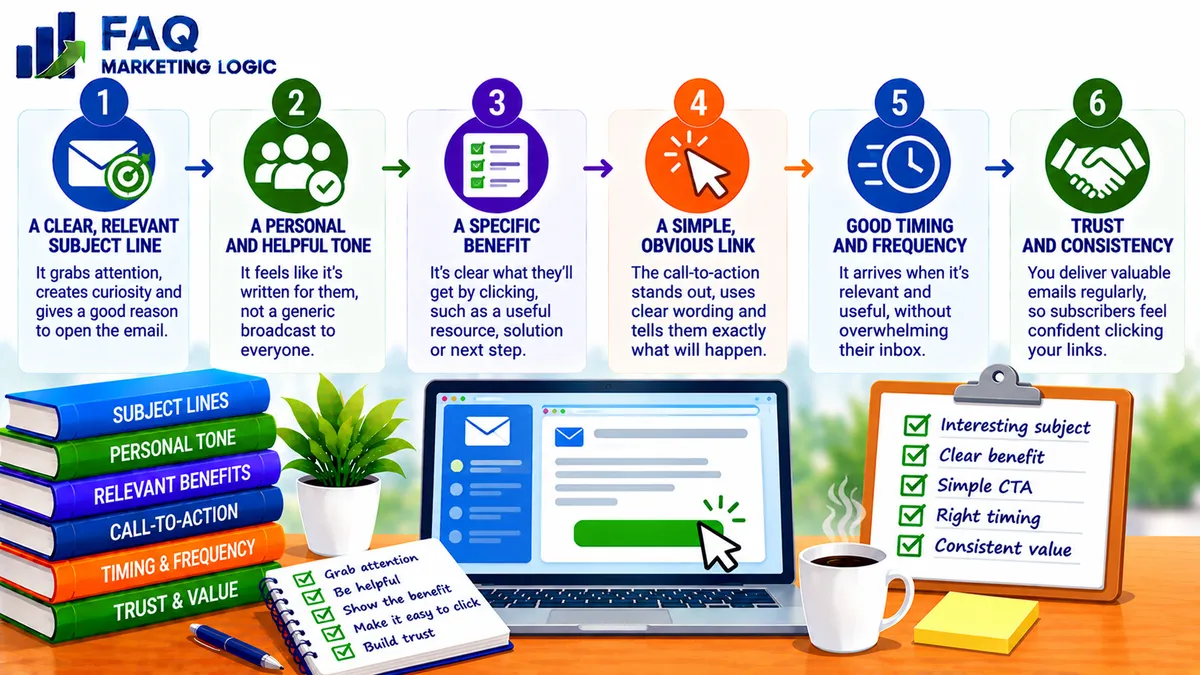
Subscribers click links in emails when the message gives them a clear, relevant reason to take the next step.
A compelling subject line may encourage someone to open an email, but it's the content that helps them decide whether clicking is worthwhile.
The most effective approach is to connect the reader's interests with a useful benefit, explain what they'll discover and make the link easy to recognise.
You don't need clever tricks or exaggerated promises. You need an email that makes the next action feel useful, natural and worth the reader's time.
IN SHORT
Getting someone to open an email is only part of the challenge.
Once they're reading, they need to understand why they should click the link you've included.
Perhaps you're recommending an article, introducing a product, sharing a free resource or inviting subscribers to explore an offer.
Whatever the destination, the link should serve a clear purpose.
Subscribers are more likely to click when the subject is relevant, the message is easy to follow and the promised destination offers something they genuinely want.
That doesn't mean every email needs to generate clicks.
Sometimes your objective is simply to share useful information or maintain a relationship with your audience.
But when clicking is the intended action, the email should make that decision straightforward.
WHY THIS WORKS
Relevance Comes Before Persuasion
One of the strongest reasons subscribers click links is that the subject matters to them.
Imagine someone joins your email list because they're interested in creating their first digital product.
An email explaining how to choose a suitable product idea may immediately attract their attention.
An unrelated message about advanced advertising techniques probably won't have the same appeal.
The difference isn't necessarily the quality of the writing.
It's the connection between the message and the reader's current interests.
Before writing an email, consider why people joined your list and what they expect to receive.
What questions are they trying to answer? What problems are they working through? What would help them make progress?
The more closely your email matches those needs, the less persuasion you may need.
This is one reason email segmentation can be useful.
Instead of sending every message to every subscriber, you can organise your audience around relevant interests or behaviours.
Our article Email Segmentation: When and How to Segment Your List explores how this approach can help you deliver more relevant communication.
However, you don't need an elaborate segmentation system to begin.
Even a clear understanding of why someone subscribed can help you write more useful emails.
Give Readers A Reason To Click
A link by itself isn't particularly compelling.
If an email simply says, "Click here to read more," the subscriber has to decide whether the extra effort is worthwhile.
They may wonder what they'll discover or why the information matters.
A stronger approach explains the benefit of following the link.
For example, suppose you're promoting an article about improving sales page conversions.
You could write:
"Most sales pages don't need more information. They need to make the important information easier to understand. I've put together a short guide showing how to identify the areas that may be confusing your visitors."
That gives readers a reason to explore the article.
They understand the subject, the problem being addressed and what they can expect to learn.
The link becomes a natural continuation of the message.
This is particularly important when promoting paid products.
Subscribers need to understand why an offer is relevant before they're likely to investigate it.
Make The Email Easy To Understand
Subscribers often read emails while doing something else.
They may be checking messages between tasks, using a mobile phone or quickly reviewing their inbox.
If your email is difficult to follow, the reader may leave before reaching the link.
Clear writing makes the decision easier.
Start with one recognisable idea or problem.
Explain why it matters, provide enough context to create interest and then introduce the next step.
Avoid trying to cover several unrelated subjects in the same message.
For example, an email about improving customer engagement doesn't also need lengthy explanations of search engine optimisation, pricing and product development.
Those subjects may be useful elsewhere, but they distract from the immediate purpose.
If your emails regularly feel complicated, How Can I Make My Emails Clearer and More Direct? (Without Sounding Harsh?) provides a useful starting point.
Clear emails don't need to be short at all costs.
They need to help readers understand the message without unnecessary effort.
Create Curiosity Without Withholding The Answer
Curiosity can encourage subscribers to explore further.
People naturally want to understand something that appears relevant but isn't yet fully explained.
For example, an email might introduce a common mistake that prevents website visitors from becoming subscribers.
You explain the problem, describe why it matters and offer a link to an article showing how to address it.
That creates a natural reason to continue.
However, there's a difference between useful curiosity and deliberately withholding information.
If your email promises an important discovery but the destination contains little of value, readers may become less willing to trust future recommendations.
The same applies to exaggerated subject lines.
A dramatic promise may generate attention once, but repeated disappointment can damage engagement.
A better approach is to share enough information to be useful while making it clear what additional value the linked resource provides.
You want readers to click because they're interested in learning more, not because you've made the message unnecessarily mysterious.
Build Trust Through Consistent Communication
Subscribers are more likely to consider your recommendations when previous emails have been worthwhile.
If your messages regularly provide useful explanations, relevant resources and realistic advice, readers begin to understand what they can expect.
That familiarity can make future links more appealing.
However, trust develops through experience.
It isn't created by repeatedly telling subscribers that your content is valuable.
You demonstrate it by delivering what you promise.
If an email recommends a beginner-friendly guide, the linked resource should genuinely be suitable for beginners.
If you describe a product as a practical introduction, it shouldn't require extensive specialist knowledge to understand.
Consistency also matters.
Subscribers who receive useful information between promotions may be more receptive when you introduce an appropriate offer.
That doesn't mean every email must contain a lengthy lesson.
A short, helpful observation can be just as valuable when it addresses something your audience cares about.
Use A Clear Call To Action
A call to action tells readers what they can do next.
It might invite them to read an article, download a resource, explore a product or watch a demonstration.
The important thing is to make the action specific.
Compare these two examples:
"Click here."
"Read the guide to improving email engagement."
The second example explains what the reader will find.
It removes unnecessary uncertainty.
A useful call to action also fits naturally with the surrounding message.
If you've spent the email discussing a problem with writing effective sales messages, the next step should relate to that subject.
For example, someone interested in developing more effective email marketing may want to explore The Lazy Way To Email Riches.
That recommendation makes more sense when the email has already established why improving email communication matters.
The link shouldn't appear as an unrelated interruption.
It should feel like a reasonable next step for someone interested in the subject.
For a closer look at the wording and placement of email links, see How to Structure Email CTAs for Higher Conversions.
Don't Overwhelm Readers With Too Many Choices
It's tempting to include several links in every email.
You might recommend your latest article, promote a product, introduce another resource and invite readers to visit your website.
Each link may be relevant individually.
However, too many competing options can make it harder for subscribers to identify the main action.
If the email has one primary objective, make that objective obvious.
You can include more than one link when there's a good reason, but avoid making readers choose between several unrelated destinations.
For example, a newsletter containing three separate article summaries may reasonably include three links.
A focused promotional email usually benefits from a clearer path towards one offer.
The number of links isn't the most important factor.
What matters is whether readers can understand what you want them to do and why that action is worthwhile.
Make Sure The Destination Matches The Promise
A click isn't the end of the customer journey.
It's the beginning of another stage.
If your email promises a practical guide to improving email engagement, the destination should provide that information.
If it introduces a product, the sales page should clearly explain the offer.
A mismatch can create disappointment even when the email generates plenty of clicks.
Imagine receiving a message promising a free checklist.
You click the link and arrive at a lengthy sales page that barely mentions the checklist.
You may feel that the email didn't accurately represent what was being offered.
That experience can affect whether you trust future recommendations.
Make sure the language in your email matches the linked page.
Use similar terminology, maintain the same central promise and make the next action easy to find.
The objective isn't simply to increase clicks.
It's to help interested subscribers reach information or offers that genuinely meet their expectations.
Measure Clicks Without Ignoring The Bigger Picture
Click-through rates can help you understand whether subscribers are engaging with your links.
However, they shouldn't be viewed in isolation.
An email with a high click rate may attract curiosity without generating meaningful results.
Another email might receive fewer clicks but attract readers who are more interested in the product or resource being promoted.
The right measure depends on your objective.
If you're promoting an article, you might examine clicks and what visitors do after reaching the website.
If you're introducing a product, you may want to review sales and revenue alongside click activity.
You should also consider the size and composition of your audience.
A small email list can produce substantial percentage changes from only a few clicks.
Avoid drawing major conclusions from one message.
Look for patterns across several emails and compare messages with similar purposes.
Our article How to Increase Email Engagement and Click-Through Rates explores the wider relationship between useful content and subscriber activity.
The objective is to learn what your audience responds to, not simply to chase the highest possible percentage.
PRACTICAL EXAMPLE
Imagine you have an email list of 1,000 subscribers interested in starting an online business.
You want to promote an article about choosing a suitable digital product idea.
Your first email reads:
"Hi, I've published a new article on my website. Click here to read it."
The message is straightforward, but it doesn't explain why the article matters.
Now consider a different approach.
You begin by explaining that beginners often spend too much time developing products before checking whether anyone wants them.
You briefly describe how this can lead to wasted effort.
Then you introduce the article as a practical guide to identifying an idea worth exploring before committing to development.
Your call to action reads:
"Read the guide to checking your digital product idea."
The second message gives subscribers a clearer reason to click.
It connects the article with a recognisable problem and explains the benefit of reading it.
Suppose the original email generates 20 unique clicks from 1,000 delivered emails.
That's a 2% unique click rate based on delivered messages.
If the revised email generates 35 unique clicks from the same number of delivered emails, the rate rises to 3.5%.
That's 15 additional clicks.
These figures are illustrative rather than a prediction.
The example demonstrates how explaining the value of a linked resource can make an email more useful and potentially encourage greater engagement.
REAL TALK
It's easy to become obsessed with email clicks.
You send a message, check the statistics and wonder why more people didn't follow the link.
Perhaps you rewrite the subject line, add another button or make the call to action more prominent.
Those changes can sometimes help.
But there's a more important question.
Did the email give subscribers a worthwhile reason to click?
If the subject doesn't interest them, stronger wording probably won't make much difference.
If the linked resource doesn't solve a problem they care about, adding more links won't create genuine demand.
And if every email feels like another attempt to sell something, readers may gradually pay less attention.
Good email marketing isn't about persuading everyone to click everything.
It's about helping interested subscribers recognise when a resource or offer is relevant to them.
Sometimes the most useful email is one that provides a complete answer without requiring a click.
That can still contribute to a stronger relationship with your audience.
COMMON MISTAKES
Mistake: Including a link without explaining its value.
You expect subscribers to click simply because you've added a button or hyperlink.
Fix: Explain what readers will discover and why it matters to them.
Mistake: Using curiosity without delivering anything useful.
You create dramatic promises that the destination doesn't fulfil.
Fix: Make curiosity relevant and ensure the linked content delivers what the email promises.
Mistake: Promoting unrelated offers.
You send products or resources that don't match the interests of your subscribers.
Fix: Connect your recommendations with the reasons people joined your list.
Mistake: Including too many competing calls to action.
You give readers several unrelated choices without making the main objective clear.
Fix: Prioritise one action when the email has one central purpose.
Mistake: Measuring clicks without considering results.
You focus on click-through rates while ignoring whether the activity supports your business objectives.
Fix: Review the quality and outcomes of clicks alongside the number generated.
FAQ QUICK FIX
Want to encourage more subscribers to click your email links?
Choose one email you're planning to send and work through these five checks.
1. Identify the reader's interest.
Why would someone on your list care about this subject?
2. Explain the problem or opportunity.
Give subscribers enough context to understand why the message matters.
3. Introduce the benefit.
Explain what they'll gain by following the link.
4. Make the action clear.
Use a descriptive call to action that tells readers what they'll find.
5. Check the destination.
Make sure the linked article, resource or offer delivers what the email promises.
Then review the results after sending.
You don't need to rewrite your entire email strategy.
Start by making the reason to click clearer.
FAQ
Why Do Subscribers Open Emails But Not Click Links?
They may be interested in the subject but see no compelling reason to continue. The email might provide everything they need, the link may be unclear or the destination may not seem relevant.
Does A Strong Subject Line Increase Email Clicks?
A strong subject line can encourage opens, which creates an opportunity for clicks. However, the content still needs to give readers a relevant reason to follow the link.
Should Every Marketing Email Include A Link?
No. Some emails are designed to provide useful information, build relationships or maintain communication. Include a link when it serves a clear purpose.
Is It Better To Use Buttons Or Text Links?
Both can work. Buttons may make an important action more noticeable, while descriptive text links can fit naturally into a conversational message. Clarity, accessibility and relevance matter more than the format alone.
How Many Links Should I Include In An Email?
There isn't one ideal number. A focused email may need only one destination, while a newsletter containing several resources may reasonably include multiple links.
What Is A Good Email Click-Through Rate?
It depends on your audience, industry, message type and how the rate is calculated. Rather than relying on a universal benchmark, compare similar emails over time and examine whether clicks produce worthwhile results.
TRY THIS TODAY
Open one of your recent emails that contained a link.
Read it from the perspective of someone who receives several marketing messages every day.
Ask yourself:
Is the subject relevant to the subscriber?
Does the opening give a reason to keep reading?
Is the main message easy to understand?
Have I explained why the linked resource matters?
Does the email create useful curiosity?
Is the call to action specific?
Can readers easily recognise the link?
Are there unnecessary competing links?
Does the destination match the promise?
Would I consider the next step worthwhile?
Now rewrite the sentence immediately before your main link.
Instead of simply telling subscribers to click, explain what they'll gain by doing so.
For example, replace:
"Click here to read my latest article."
With:
"If you're struggling to decide what to write to your subscribers, this guide explains how to choose useful email topics that keep your messages relevant."
Then use a descriptive link such as:
"Read the guide to planning useful emails."
The improvement doesn't need to be dramatic.
Sometimes a clearer explanation is enough to make the next step more appealing.
Want To Make Your Email Marketing More Effective?
Getting subscribers to click is useful, but clicks alone don't build an email marketing business.
You also need to develop trust, provide relevant information and introduce offers that genuinely match your audience's interests.
A clear email strategy can help you connect those activities rather than treating every message as an isolated promotion.
If you'd like to explore how email marketing can support an information publishing business, The Lazy Way To Email Riches introduces an approach to using email communication to develop customer relationships and promote relevant offers.
→ Discover The Lazy Way To Email Riches
RELATED ARTICLES
→ How Long Should Marketing Emails Be? (Short vs Long Explained)
→ What Emails Actually Drive Sales?
→ How Often Should You Send Emails?
QUICK RECAP
Subscribers click links when an email gives them a relevant and worthwhile reason to take the next step.
Start with subjects your audience genuinely cares about.
Connect the message with a recognisable problem or opportunity.
Explain the benefit of following the link.
Keep the email clear and focused.
Create curiosity without making misleading promises.
Build trust through consistent, useful communication.
Use descriptive calls to action.
Avoid overwhelming readers with competing choices.
Make sure the destination matches the email.
Measure meaningful results rather than clicks alone.
You don't need to persuade every subscriber to click every message.
You need to help the right readers recognise when the next step is useful to them.
A good email doesn't just ask for a click. It gives the reader a reason to want one.
NEXT STEP
Once you've improved how you encourage subscribers to follow links, the next challenge is understanding how those clicks can become meaningful purchasing decisions.