
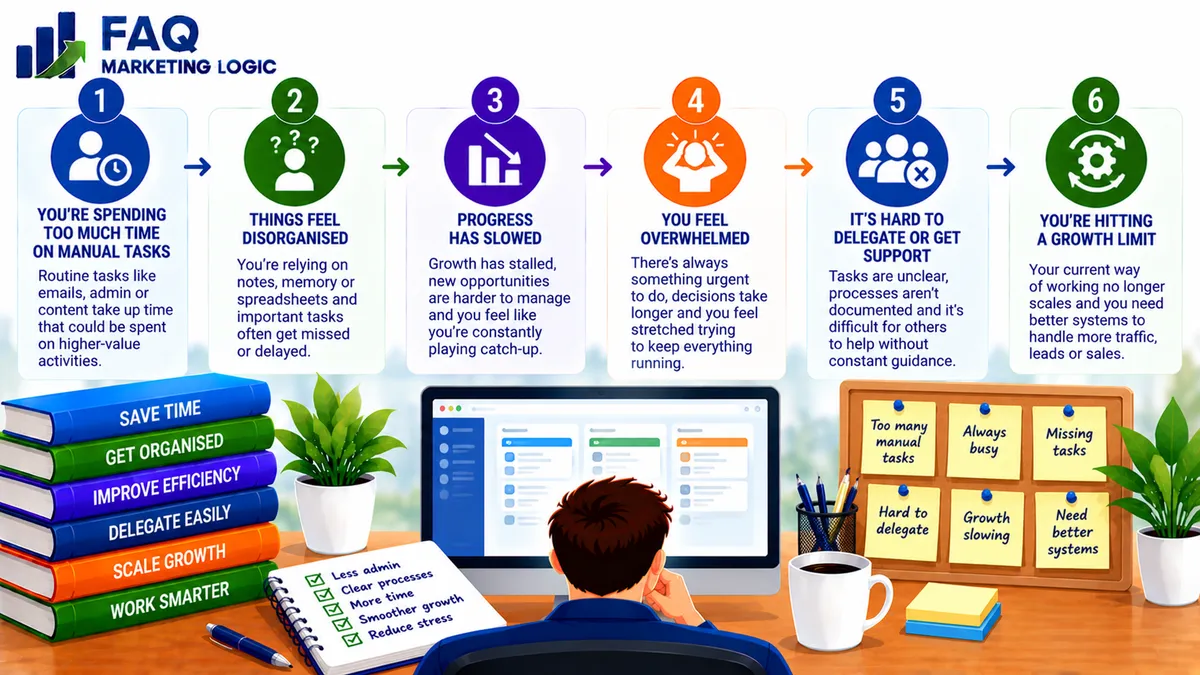
How Do I Know When My Business Needs Better Systems?
Your business probably needs better systems when routine tasks regularly take longer than they should, important activities get forgotten or everyday work becomes difficult to manage.
You may also notice repeated mistakes, inconsistent customer experiences or an increasing dependence on your personal involvement.
The solution doesn't necessarily involve expensive software or complicated automation. Often, a simple checklist, documented procedure or clearer working routine can make a significant difference.
The goal is to make important business activities easier to complete consistently and reliably.
IN SHORT
Business systems are the processes, tools and routines that help you manage recurring activities.
They might cover content publishing, customer enquiries, product delivery, email marketing or reviewing business performance.
When these activities become increasingly difficult to organise, it's often a sign that your existing systems need improving.
Common warning signs include:
Repeating the same work unnecessarily.
Forgetting important tasks or deadlines.
Constantly reacting instead of planning.
Making the same mistakes repeatedly.
Spending too much time managing software.
Struggling to handle an increasing workload.
You don't need to fix everything immediately.
Start by identifying the recurring problem that's creating the most difficulty.
WHY THIS WORKS
1. You're Repeating The Same Work Unnecessarily
One of the clearest signs that your business needs better systems is repeatedly completing routine activities from scratch.
Perhaps you manually prepare the same customer email whenever someone purchases a product.
Maybe you spend time searching for information that should be stored in one accessible location.
Or you begin each morning deciding what needs doing because there's no established workflow.
These activities may seem insignificant individually, but the time involved can accumulate.
A simple system creates a consistent way to complete necessary work.
For example, a standard content publishing process could include preparing the article, checking formatting, adding internal links and reviewing the finished page.
Instead of remembering every step separately, you follow an established procedure.
If you're unsure how to begin, How Do I Build Repeatable Business Processes? explains how to turn recurring activities into manageable workflows.
2. Important Tasks Depend On Your Memory
Another warning sign is having to remember everything yourself.
You might need to recall which customers require follow-up, which articles are scheduled or whether an important payment has been received.
As your workload increases, relying entirely on memory becomes less reliable.
A basic tracking system can reduce that risk.
For example, a spreadsheet or task manager might record the task, its deadline and whether it's been completed.
This is particularly useful for recurring responsibilities such as customer follow-ups, content publishing and monthly financial checks.
The purpose isn't to monitor every minute of your working day.
It's to make sure important responsibilities don't get overlooked when you're busy.
3. You're Constantly Reacting Instead Of Planning
Unexpected problems are part of running an online business.
Customers may need assistance, technical issues can appear and deadlines sometimes change.
You can't eliminate every interruption.
However, if most of your working time is spent responding to whatever appears next, you may need a clearer planning process.
A simple weekly routine can help separate planned work from genuine emergencies.
For example, you might allocate particular times for preparing content, responding to enquiries and reviewing business performance.
This gives important activities a predictable place in your schedule while leaving room for unexpected problems.
Our guide What's the Simplest Weekly Review System? explains how to review progress without adding unnecessary administration.
4. Small Mistakes Keep Happening
Occasional mistakes are inevitable, but repeated errors involving the same activity often suggest that the process needs attention.
Perhaps customers occasionally receive the wrong download link.
Maybe published articles contain outdated information, or promotional emails go out without checking their destination links.
If the same problem keeps returning, simply reminding yourself to be more careful may not be enough.
A checklist or standard procedure can make important checks part of the normal workflow.
For digital product delivery, that might mean testing the checkout, confirmation email and download link before launching an offer.
For publishing, it could involve checking headings, images, internal links and page details before making an article live.
A good system reduces opportunities for avoidable mistakes rather than relying entirely on memory.
5. Your Tools Are Creating More Work
Software should make business activities easier.
However, it's possible to reach a point where managing your tools becomes a significant part of the workload.
You might have customer information stored in several applications, overlapping subscriptions or systems that don't communicate properly.
Instead of completing a task once, you find yourself transferring the same information between different platforms.
This doesn't necessarily mean you need more automation.
You may need fewer tools or a clearer process.
Before introducing another application, consider whether you could remove duplicate steps, consolidate information or simplify the workflow.
Once the process is clear, you can decide whether automation would help.
Our article How Do I Know Which Business Tasks To Automate? explains how to identify suitable opportunities without automating unnecessary work.
6. Growth Is Making Everyday Work Harder
A business can operate comfortably with a small number of customers and become increasingly difficult to manage as activity grows.
For example, manually delivering five digital products each month may be manageable.
Delivering fifty products using the same method could become unnecessarily time-consuming.
The same applies to customer support, email marketing and routine administration.
As the workload increases, weaknesses in existing processes become more noticeable.
Better systems can help you manage that growth.
Automated product delivery, a structured customer support process or a consistent publishing workflow may reduce the amount of manual work required.
However, growth doesn't automatically justify complicated technology.
The right system depends on the actual problem you're trying to solve.
7. Your Business Depends On Your Constant Attention
Another warning sign is that routine activities stop whenever you're unavailable.
For example, if every digital purchase requires you to send a download link manually, customers may have to wait until you can respond.
If every small decision depends on you, the business can become increasingly demanding.
Documented procedures and appropriate automation can reduce that dependence.
This becomes particularly important with recurring-income businesses, where customers expect reliable access and ongoing service.
If you're interested in that approach, Make Cash Like Clockwork introduces a business model focused on developing recurring revenue.
Systems don't replace the need for a useful offer or good customer service.
They help you deliver those things more consistently.
8. You Don't Know What's Working
A final warning sign is struggling to understand how your business is performing.
You might know how much money entered your account last month but not which products generated it.
Perhaps you're publishing regularly without reviewing which articles attract visitors.
Or you're paying for marketing activities without knowing whether they're producing worthwhile results.
You don't need to measure everything.
However, a simple reporting routine can help you understand the figures that influence your decisions.
For a small business, that might involve reviewing monthly revenue, expenses, sales and a few important marketing results.
The purpose is to identify useful patterns and recognise problems before they become more difficult to address.
A straightforward report that you actually review is often more useful than a complicated dashboard that nobody checks.
PRACTICAL EXAMPLE
Imagine you run a small digital publishing business.
You sell downloadable guides, publish regular articles and maintain an email list.
At first, everything is manageable.
You prepare articles when you have time, manually deliver occasional purchases and keep important information in a collection of notes.
As the business develops, the workload increases.
You begin forgetting which articles need updating. Customer enquiries interrupt your writing time, and locating the correct product files becomes more difficult.
You consider purchasing an expensive automation platform.
However, before doing so, you examine the actual problems.
You discover that three relatively simple improvements would help:
A publishing checklist covering content preparation, links, images and scheduling.
An organised product delivery process that makes the correct files easy to locate and distribute.
A weekly review to identify unfinished work and upcoming commitments.
These improvements don't require a complete business rebuild.
They simply make existing activities easier to manage.
Once those processes work reliably, you can decide whether automating particular steps would provide additional benefits.
REAL TALK
There's a tendency to associate business systems with complicated software, automation platforms and elaborate workflows.
But a system can be as simple as a checklist that prevents you from forgetting an important step.
If you're running a small online business, you probably don't need the same infrastructure as a company employing fifty people.
You need processes that suit the business you actually have.
The danger is spending so much time building systems that you have less time available for the work those systems are supposed to support.
A beautifully organised dashboard doesn't create sales, and an elaborate automation won't make an unsuitable product more appealing.
Start with the problems you're experiencing.
Then introduce the smallest practical improvement that addresses them.
COMMON MISTAKES
Mistake: Buying software before understanding the problem.
Fix: Document the existing process and identify what's causing difficulty before choosing a tool.
Mistake: Automating a process that doesn't work properly.
Fix: Simplify and test the process before considering automation.
Mistake: Creating systems for activities that rarely happen.
Fix: Prioritise frequent, important or error-prone tasks where improvements will provide meaningful benefits.
Mistake: Making systems too complicated.
Fix: Keep instructions practical and remove unnecessary steps.
Mistake: Never reviewing existing systems.
Fix: Check important workflows periodically and adjust them when circumstances change.
FAQ QUICK FIX
Want to know whether your business needs better systems?
Choose one activity that's becoming frustrating or difficult to manage.
Then work through these five checks.
1. Identify the recurring problem.
What keeps going wrong, taking too long or getting forgotten?
2. Examine the current process.
Write down how the task is completed from beginning to end.
3. Look for unnecessary steps.
Are you repeating work, transferring information manually or completing activities that no longer serve a useful purpose?
4. Choose one practical improvement.
Could a checklist, template, schedule or clearer procedure solve the problem?
5. Test the new approach.
Use the improved process several times and check whether it makes the work easier and more reliable.
You don't need to redesign the entire business.
Start with one process that's causing unnecessary difficulty.
FAQ
Q: What are the signs that a business needs better systems?
Common signs include repeated mistakes, forgotten tasks, inconsistent customer experiences, duplicated work and increasing difficulty managing everyday activities.
Q: Do I need expensive software to create business systems?
No. Many useful systems begin with checklists, spreadsheets, templates and documented procedures. Software becomes valuable when it solves a specific problem more efficiently.
Q: What's the difference between a business system and automation?
A business system is the process used to complete an activity consistently. Automation uses technology to carry out some or all of that process without repeated manual involvement.
Q: Should beginners create systems before making sales?
Beginners need enough organisation to deliver their offers reliably and manage important responsibilities. More advanced systems can usually wait until specific needs become clear.
Q: Can better systems help my business grow?
Yes. Reliable processes can reduce mistakes, save time and make increasing workloads easier to manage. However, systems support growth rather than replace the need for suitable products and effective marketing.
Q: How often should I review my business systems?
Review important processes when problems appear or the workload changes. A monthly or quarterly check can also help identify procedures that need simplifying or updating.
TRY THIS TODAY
Think about the activities that caused the most frustration during your last working week.
Choose three and write them down.
For each activity, consider what made it difficult, whether you repeated work unnecessarily and whether a clearer process could help.
Then choose the problem that occurs most frequently or creates the greatest disruption.
Write a short procedure explaining how the activity should be completed.
Keep it simple enough that you would actually use it.
Test the procedure the next time the task appears and make adjustments based on what you learn.
The objective isn't to create a perfect system immediately.
It's to make one recurring business activity easier to manage.
Want To Build A Business With More Predictable Income?
Better systems can help an online business operate more consistently, particularly when managing customer relationships, product delivery and ongoing commitments.
They're especially useful when your business model involves recurring payments or continuing access to products and services.
However, reliable systems are only one part of building recurring income.
You also need an offer customers value enough to continue paying for.
If you'd like to explore that approach, Make Cash Like Clockwork introduces a business model focused on developing recurring revenue.
→ Discover Make Cash Like Clockwork
RELATED ARTICLES
→ What Simple Business Systems Do Beginners Need First?
→ How Do I Create A Simple Marketing Workflow?
→ How Do I Use AI in My Daily Workflow?
QUICK RECAP
Your business needs better systems when routine activities become unnecessarily difficult, inconsistent or time-consuming.
Look for repeated mistakes, forgotten tasks, unnecessary work and processes that struggle as your workload increases.
Start with simple checklists, templates and routines before introducing complicated software.
Review your processes regularly and improve them gradually.
The best business systems make everyday work easier, not more complicated.
NEXT STEP
Once you've identified where your business needs better organisation, the next step is improving your existing routines without creating another overwhelming project.