
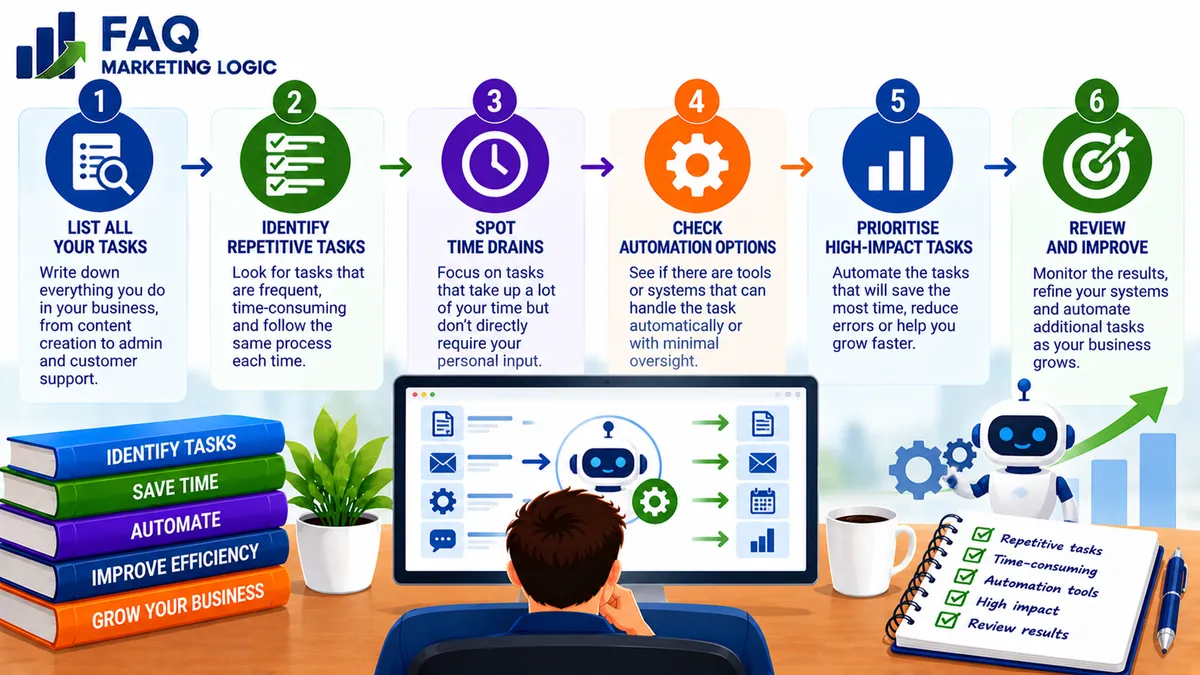
How Do I Know Which Business Tasks To Automate?
TL;DR
The best business tasks to automate are usually repetitive, predictable and governed by clear rules. They take time to complete manually but don't require a fresh decision every time.
Before automating anything, make sure the task is necessary and that the existing process works properly. Automating a confusing or ineffective process generally makes the problem happen faster.
Start with one small task, test the automation and check that it saves time without creating new problems.
IN SHORT
You can identify business tasks worth automating by looking for activities you repeat frequently, follow a consistent process and can complete without much personal judgement.
Good candidates might include delivering digital products, sending welcome emails, scheduling routine reminders or recording customer information.
Tasks involving sensitive decisions, personal relationships or unusual circumstances may still need human involvement.
The aim isn't to automate as much as possible. It's to remove unnecessary manual work so you can spend more time on activities that genuinely move the business forward.
WHY THIS WORKS
Start By Looking At Repetitive Work
Most online businesses contain small tasks that need to be completed repeatedly.
You might send the same welcome message whenever someone subscribes, deliver a download after a purchase or manually transfer customer details between systems.
Individually, these activities may take only a few minutes. However, the time adds up as the business develops.
A useful starting point is to keep track of the tasks you complete over a normal working week. Look for activities that follow the same steps each time and don't require much independent judgement.
These are often the simplest opportunities for automation because the process is already reasonably predictable.
Decide Whether The Task Needs Doing At All
Before choosing an automation tool, ask whether the task is actually necessary.
It's surprisingly easy to spend time improving a process that no longer serves a useful purpose.
For example, you might be manually preparing several reports every week even though nobody uses the information to make decisions.
Automating those reports would save some time, but removing the unnecessary work would save even more.
The same applies to complicated approval processes, duplicate data entry and routine activities that have accumulated as the business has grown.
Simplification should come before automation.
If a task doesn't contribute anything useful, the best solution may be to stop doing it.
Look For Tasks With Clear Rules
Automation works particularly well when you can describe exactly what should happen and when.
For example, when someone purchases a digital guide, your system might need to confirm the payment, provide access to the product and send a receipt.
The process has a clear trigger and a predictable set of actions.
Compare that with deciding whether to introduce a new product, change your pricing or respond to a dissatisfied customer.
Those activities may involve information that software can help organise, but the decisions themselves require more consideration.
A useful question is whether you could write down the task as a simple set of instructions that would work in most circumstances.
If the answer is yes, it may be a suitable automation candidate.
Consider The Time Saved And The Cost Involved
Not every repetitive task is worth automating immediately.
Suppose you spend five minutes each month completing a particular activity. Setting up an automation might take several hours, and the software could introduce an ongoing subscription cost.
The saving may not justify the effort.
Now consider a task that takes ten minutes every working day. That adds up to around 200 minutes over four weeks.
If a reliable automation could handle most of that work, the potential benefit becomes more meaningful.
However, time saved isn't the only consideration. You should also account for setup, testing, maintenance and the consequences of something going wrong.
The best automation is one that provides a practical benefit without introducing unnecessary expense or complexity.
Automate Delivery And Follow-Up Where Appropriate
Digital businesses often have opportunities to automate routine customer communication.
For example, when someone joins an email list, an automated welcome sequence can deliver the promised resource, explain what to expect and introduce relevant information over the following days.
Similarly, a digital product purchase can trigger payment confirmation and product delivery without requiring you to send each message manually.
These systems can improve consistency because customers don't have to wait for you to be available.
Automation can also support recurring business models. Membership access, subscription reminders and routine onboarding are examples of activities that may benefit from reliable systems.
If you're exploring a business model built around ongoing customer relationships and recurring revenue, Make Cash Like Clockwork introduces that wider approach.
The important distinction is that automation supports the business model. It doesn't replace the need for a useful offer or a positive customer experience.
Keep Human Judgement Where It Matters
Some activities should not be handed over completely to automated systems.
Customer complaints, unusual refund requests, sensitive personal information and important business decisions may require individual attention.
Even when software can prepare a response or organise relevant details, someone should remain responsible for checking that the outcome is appropriate.
You should also consider what happens when the normal process fails.
For example, an automated product delivery system needs a way to identify unsuccessful deliveries and help customers who cannot access their purchases.
A reliable automation doesn't simply complete the expected steps. It also makes problems visible so they can be corrected.
Test One Automation Before Adding More
It's tempting to connect several tools and automate an entire business process in one go.
Unfortunately, the more complicated the system becomes, the harder it can be to identify the cause when something stops working.
A better approach is to choose one manageable task and automate it first.
Document what should happen, configure the process and test it using realistic examples. Check that the correct information is transferred, the right messages are sent and any errors can be identified.
Then allow the automation to operate while you monitor the results.
Once it works reliably, you can consider the next task.
This gradual approach helps you build useful systems without turning everyday business operations into a complicated technical project.
PRACTICAL EXAMPLE
Imagine you sell a $29 digital workbook through your website.
Every time someone purchases, you manually check the payment, send the download link and update a customer spreadsheet.
The process takes around eight minutes per order.
With 25 sales each month, that's approximately 200 minutes of manual work.
You decide to automate the routine parts of the process.
Your checkout system confirms successful payment, sends the customer a delivery email and records the purchase in your customer management system.
You then test the process to make sure the correct product is delivered, customer details are accurate and unsuccessful transactions don't trigger access.
Once everything works properly, the automation removes most of the repetitive work.
You still review exceptions and respond personally when customers need help, but you no longer have to handle every routine order yourself.
The benefit isn't simply saving a few hours.
You've also created a more consistent delivery process that can continue working when you're busy with other activities.
REAL TALK
Automation has become one of those business subjects where the technology can easily become more interesting than the problem it's supposed to solve.
It's possible to spend an entire afternoon connecting applications to save yourself five minutes of work.
That might be enjoyable if you like experimenting with software, but it isn't necessarily good business management.
Before automating anything, ask what you're actually gaining.
Will it save meaningful time? Reduce avoidable mistakes? Improve the customer experience? Make an important process more reliable?
If the answer isn't clear, you may not need another automation.
Sometimes a simple checklist, a better template or removing an unnecessary task will accomplish more than another piece of software.
The purpose of automation is to make the business easier to operate, not to create a second business devoted to managing your tools.
FAQ QUICK FIX
Want to find out which business task you should automate next?
Choose five activities you regularly complete and examine each one.
Then work through these checks.
1. Identify how often the task happens.
Is it something you do every day, every week or only occasionally?
2. Measure the time involved.
How long does it take, and how much time could you realistically save?
3. Check whether the process is predictable.
Can the task be completed using clear rules without making a different judgement every time?
4. Consider the consequences of mistakes.
Would an error be easy to correct, or could it create problems for customers or the business?
5. Compare the benefit with the setup cost.
Will the time saved and improved consistency justify the effort, expense and maintenance?
Choose the task with the clearest practical benefit rather than automatically selecting the most complicated process.
FAQ
What Business Tasks Are Easiest To Automate?
Tasks with clear triggers and repeatable steps are usually the easiest. Examples include delivering digital downloads, sending routine confirmation emails, scheduling reminders and recording straightforward customer information.
Should I Automate My Business Before Making Sales?
You only need enough systems to deliver your offer reliably. Complex automation can usually wait until you understand which processes are necessary and where manual work is becoming a problem.
Can AI Automate My Daily Business Tasks?
AI can help draft messages, organise information, classify enquiries and assist with routine work. However, its output may need checking, particularly where accuracy, customer information or important decisions are involved.
Is Automation Worth It For A Small Business?
It can be, especially when a simple automation removes frequent manual work or improves customer service. However, the benefit should justify the cost and complexity of the system.
What Should I Avoid Automating?
Be cautious with activities requiring sensitive judgement, personalised customer support or decisions with significant consequences. Automation may assist these tasks, but human oversight is often important.
How Do I Know If An Automation Is Working?
Check whether it completes the intended task accurately, saves meaningful time and handles errors appropriately. Monitor the process regularly rather than assuming it will continue working indefinitely.
TRY THIS TODAY
Write down the five most repetitive tasks you completed during your last working week.
For each task, record:
How often you completed it.
Approximately how much time it took.
Whether you followed the same steps each time.
Whether mistakes would be easy to identify.
Whether the task could be simplified or removed.
What an automated version would need to do.
Now choose one task that is frequent, predictable and relatively low-risk.
Write out the steps from beginning to end, including what should happen if something goes wrong.
You don't need to purchase software today.
The first objective is to understand the process clearly enough to decide whether automating it would genuinely help.
Want To Build A Business That Runs More Consistently?
Automation is useful when it supports a business model with repeatable activities, reliable delivery and clear customer processes.
Recurring-income businesses are one example where consistent systems can become particularly valuable, especially when managing memberships, subscriptions and ongoing customer relationships.
If you'd like to explore how that type of business can work, Make Cash Like Clockwork introduces an approach to building recurring income rather than relying entirely on individual sales.
→ Discover Make Cash Like Clockwork
RELATED ARTICLES
→ How Do I Build Repeatable Business Processes?
→ How Do I Use AI in My Daily Workflow?
→ How Do I Create A Simple Marketing Workflow?
QUICK RECAP
The best tasks to automate are those that remove unnecessary manual work without creating additional complexity.
Identify activities you repeat regularly.
Remove unnecessary tasks before automating them.
Look for processes with clear rules and predictable outcomes.
Compare potential time savings with setup and maintenance costs.
Prioritise reliable customer delivery and routine administration.
Keep human judgement involved where appropriate.
Test automations before relying on them.
Make sure errors can be identified and corrected.
Introduce new automations gradually.
You don't need an entirely automated business to benefit from better systems.
Start by removing one repetitive task that takes time away from more valuable work.
NEXT STEP
Once you've identified the tasks worth automating, the next step is deciding which one will provide the greatest practical benefit.