How Many CTAs Should I Use?
TL;DR
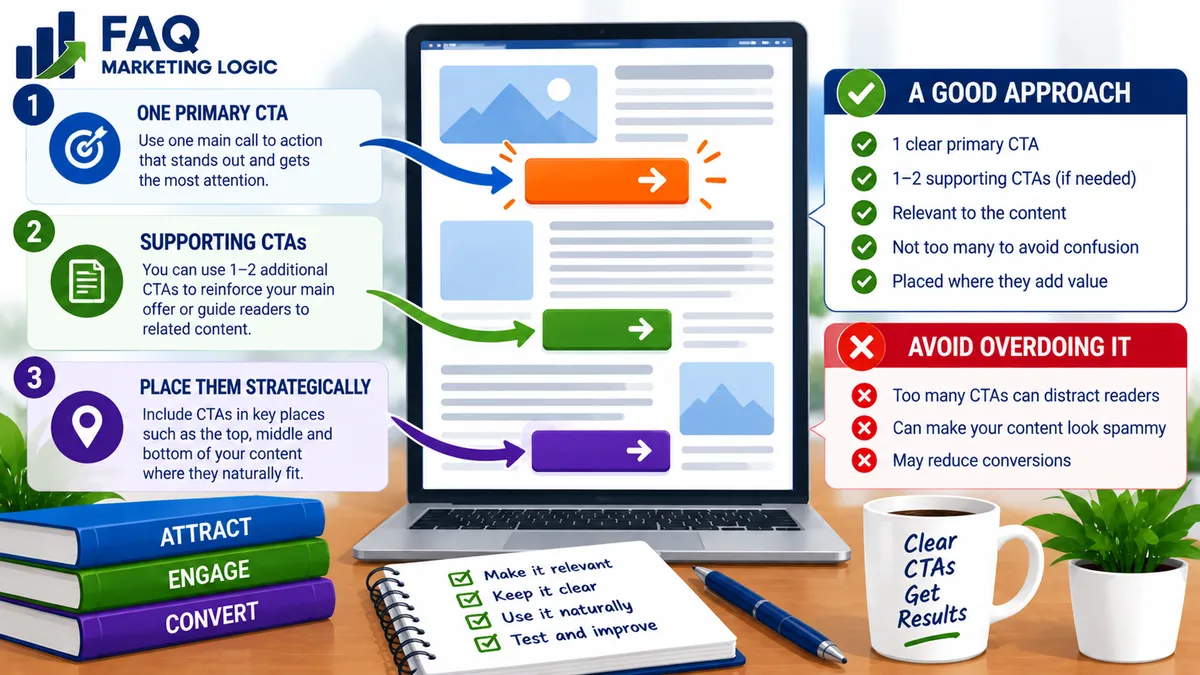
There is no single perfect number of calls-to-action for every page.
A short page may need only one CTA, while a longer sales page may repeat the same CTA several times so visitors can act when they're ready.
The important distinction is between multiple CTA placements and multiple competing actions.
Repeating the same primary action can make a page easier to use. Asking visitors to buy, subscribe, download, follow, book a call and read another article at the same time can create confusion.
Focus on one primary conversion goal, then place the CTA where it naturally supports the visitor's decision.
IN SHORT
You've probably heard advice such as:
"Every page should have one CTA."
That can be useful guidance.
But it doesn't necessarily mean:
"Every page should contain only one button."
Imagine a long sales page with 3,000 words.
Some visitors may be ready to buy after reading the opening sections.
Others may want to see:
What's included
Testimonials
Pricing
Guarantee
FAQs
before deciding.
Making everyone scroll to the bottom simply to find the only purchase button doesn't automatically improve the page.
You can repeat the same CTA at sensible points without creating several different conversion goals.
That's the distinction that matters.
REAL TALK
CTA advice often becomes unnecessarily complicated.
Add more buttons.
Remove buttons.
Put one above the fold.
Never put one above the fold.
Use three.
Use five.
Use one.
The better question isn't:
"How many CTA buttons am I allowed?"
It's:
"What do I want this visitor to do, and when might they reasonably be ready to do it?"
Once that's clear, CTA placement becomes much easier.
Key Definition: What Is A Call-To-Action?
A call-to-action (CTA) is an instruction that tells a visitor what action to take next.
Examples include:
Buy Now
Get Instant Access
Start Your Free Trial
Join The Membership
Download The Guide
Book A Consultation
Subscribe
Get A Quote
A CTA can appear as:
A Button
A Text Link
A Form
A Banner
A Written Instruction
The purpose is the same.
It turns:
"Here's some information."
into:
"Here's what you can do next."
What's The Difference Between A CTA And A CTA Placement?
This is where much of the confusion begins.
Suppose your sales page contains four buttons:
Get Instant Access
Get Instant Access
Get Instant Access
Get Instant Access
All four lead to the same checkout.
You don't really have four competing conversion goals.
You have one primary CTA appearing in four places.
Now imagine the page contains:
Buy The Course
Join My Newsletter
Follow Me On Facebook
Download My Free Guide
Book A Call
Those are five different actions.
The visitor now has to decide which action you actually want them to take.
That's a very different situation.
How Many CTAs Should A Short Landing Page Have?
A short landing page may only need one primary CTA.
For example, imagine a simple opt-in page containing:
Headline
Short explanation
Three benefits
Email form
CTA button
The purpose is obvious:
Join the email list.
Repeating the same form four times on a very short page could add unnecessary clutter.
One strong CTA may be enough.
How Many CTAs Should A Long Sales Page Have?
A longer sales page can justify several CTA placements.
For example:
CTA 1: After the initial offer has been introduced.
CTA 2: After the main benefits and product contents.
CTA 3: After proof and objection handling.
CTA 4: Near the bottom after the FAQ or guarantee.
They're all asking the visitor to take the same action.
This allows different types of buyers to act when they've seen enough information.
The number isn't the important part.
The logic behind the placement is.
Should I Put A CTA Above The Fold?
Sometimes.
If visitors already understand the offer, an early CTA can be useful.
This is particularly relevant when:
The product is simple
The audience already knows you
Visitors are returning
Traffic comes from a highly specific promotion
The action requires little commitment
But an early CTA doesn't mean the visitor must act immediately.
Someone who isn't ready can simply continue reading.
For a more complicated or unfamiliar offer, the page may need to establish more context before asking for a significant commitment.
The CTA should fit the decision being requested.
Place CTAs After Moments Of Increased Confidence
Instead of adding a button every few paragraphs, look for natural decision points.
A visitor's confidence may increase after they understand:
The main benefit
How the product works
What's included
The price
Customer proof
The guarantee
The answer to an important objection
Those can be sensible places to offer the next step.
Think:
Information → increased confidence → opportunity to act
rather than:
Paragraph → button → paragraph → button → paragraph → button.
Don't Interrupt The Sales Argument Constantly
More CTAs don't automatically produce more conversions.
Too many buttons can make a page feel:
Pushy
Repetitive
Cluttered
Difficult to read
Imagine every section ending:
BUY NOW!
The reader hasn't had time to absorb the argument before they're being asked again.
CTA placement should support the sales message rather than constantly interrupting it.
What Is A Primary CTA?
Your primary CTA is the main action you want the visitor to take.
On a sales page:
Buy the product.
On a lead-generation page:
Join the email list.
On a consultation page:
Book a call.
On a free trial page:
Start the trial.
Defining the primary CTA before building the page helps keep everything focused.
You can then ask whether each additional action supports or distracts from that goal.
Can I Have A Secondary CTA?
Yes, sometimes.
A secondary CTA can make sense when some visitors aren't ready for the primary action.
For example, your main goal might be:
Buy The Course
while a quieter secondary option is:
See The Course Curriculum
That's not necessarily competing with the purchase. It may help the visitor evaluate it.
But imagine your secondary CTA is:
Visit Our Blog
Now you're deliberately sending someone away from the sales decision.
That might still be appropriate in some situations, but you should understand the trade-off.
Secondary actions should have a clear reason for existing.
What About Navigation Links?
Technically, every link creates another possible action.
That doesn't mean every website should remove its navigation.
Context matters.
A dedicated landing page built for a specific campaign may benefit from fewer exits.
A normal website page may reasonably include:
Main navigation
Privacy policy
Terms
Contact information
Accessibility links
The goal isn't to trap people on the page.
It's to avoid surrounding the primary action with unnecessary distractions.
Should Every Blog Post Have A CTA?
A blog post should normally give the reader somewhere sensible to go next, but that doesn't mean every article needs a commercial sales CTA.
Depending on the article, the next action might be:
Read a related article
Download a relevant guide
Join an email list
Explore a product
Visit a cornerstone guide
The CTA should make sense in relation to why the reader came to that article.
Forcing an unrelated product promotion onto every post can weaken the experience.
Relevance matters more than simply having a CTA.
Can I Use More Than One CTA In An Email?
Yes, but the same principle applies.
A promotional email might contain:
A CTA near the beginning
Another after the main explanation
A final CTA in the P.S.
If they all lead to the same offer, the email still has one clear objective.
Problems can appear when an email simultaneously asks the reader to:
Buy a product
Watch a video
Read a blog post
Complete a survey
Follow a social account
Each additional decision can compete with the one that matters most.
Should Every CTA Use The Same Words?
Not necessarily.
Different CTA wording can still lead towards the same goal.
For example:
See What's Included
and later:
Get Instant Access
might both move the visitor towards purchasing.
However, avoid changing CTA wording so much that visitors become uncertain about what will happen when they click.
Clarity is more important than variety.
Make The CTA Specific
Generic buttons such as:
Submit
Continue
Click Here
can work, but they often provide very little information.
Compare:
Submit
with:
Send Me The Free Guide
Or:
Continue
with:
See Membership Options
The second version gives the visitor more context.
Your CTA doesn't need to be clever.
It should help the visitor understand what happens next.
Does CTA Design Matter?
Yes, but don't overcomplicate it.
A CTA should be:
Easy to find
Easy to read
Visually distinguishable
Large enough to use comfortably
Clear about the action
You don't need flashing buttons or aggressive animation.
A beautifully written CTA that nobody notices isn't very useful.
Neither is an enormous button that overwhelms everything else on the page.
The CTA should attract enough attention to be found without becoming the entire design.
What If Visitors Aren't Clicking My CTA?
Don't immediately assume the button is the problem.
Low CTA clicks could be caused by:
Weak offer
Unclear headline
Poor audience match
Lack of trust
Unanswered objections
Confusing price
Weak benefits
Page friction
Poor CTA visibility
Unclear button wording
The CTA is the point where the action happens.
But the rest of the page gives visitors the reason to take that action.
Changing "Buy Now" to "Get Started Today" won't repair an offer people don't understand.
How Should I Test CTA Placement?
If a page receives enough meaningful traffic and conversions to support testing, you can compare variations.
For example:
Version A: CTA only near the bottom.
Version B: CTA after the offer introduction and again near the bottom.
Or:
Version A: Generic button text.
Version B: More specific button text.
Change one meaningful element at a time where possible.
Otherwise, if performance changes, you won't know which change contributed.
For lower-traffic pages, don't become obsessed with tiny tests that don't have enough data to tell you anything useful.
Start with good fundamentals.
Practical Example
Imagine a long sales page for a $97 digital course.
The page includes:
Headline and opening
The visitor learns what the course helps them achieve.
CTA: Get Instant Access
Then:
Problem and solution
The reader understands why the course exists.
Course contents and benefits
They see what they'll receive.
CTA: Get Instant Access
Then:
Testimonials and FAQs
Concerns are addressed and confidence increases.
Guarantee and price
The buying decision is clear.
CTA: Get Instant Access
There are three CTA buttons.
But there's still only one primary conversion goal.
Now compare that with:
Buy The Course
Download My Free Ebook
Join My Newsletter
Book A Consultation
Follow Me On LinkedIn
The second page doesn't merely have more CTAs.
It has more decisions competing for attention.
Common Mistakes
Mistake: Believing one CTA means one button.
Fix: Distinguish between one conversion goal and multiple placements of the same CTA.
Mistake: Adding buttons everywhere.
Fix: Place CTAs at natural points where the reader may be ready to act.
Mistake: Giving every action equal importance.
Fix: Establish one primary conversion goal and make secondary actions subordinate.
Mistake: Using vague CTA wording.
Fix: Make the next step easier to understand.
Mistake: Assuming the button is responsible for every conversion problem.
Fix: Check the offer, page structure, trust and objections as well as CTA design.
Mistake: Forcing commercial CTAs into unrelated content.
Fix: Match the CTA to the reader's reason for visiting the page.
FAQ QUICK FIX
Not sure whether you have too many CTAs?
Ignore the number of buttons for a moment.
Ask:
1. What is the ONE main action I want visitors to take?
Write it down.
Then examine every CTA on the page.
2. Does this CTA support that primary action?
If yes, it may belong.
If no, ask:
3. Is there a strong reason for giving visitors this alternative?
If there isn't, consider removing it.
The aim isn't necessarily fewer buttons.
It's fewer competing decisions.
FAQ
Is One CTA Always Better Than Multiple CTAs?
No. One primary conversion goal is often useful, but the same CTA can appear several times on a longer page.
How Many CTA Buttons Should A Sales Page Have?
There is no universal number. A short page may need one, while a long page may reasonably repeat the primary CTA at several natural decision points.
Can Too Many CTAs Hurt Conversions?
Too many competing actions can create confusion and distraction. Repeating the same relevant CTA is different from asking visitors to make several unrelated decisions.
Should I Put A CTA At The Top And Bottom Of The Page?
That can make sense, particularly if some visitors already understand the offer while others need more information. The right placement depends on the page and audience.
Should A CTA Be Above The Fold?
It can be. For straightforward offers or visitors with high intent, an early CTA may be useful. More complex decisions may require additional context.
Should Blog Posts Have More Than One CTA?
They can, particularly where a contextual CTA naturally fits within the article and a fuller CTA appears later. The important thing is that both are relevant rather than competing with each other.
TRY THIS TODAY
Choose one important page on your website.
List every action a visitor can take.
Don't just count the obvious buttons.
Include:
Forms
Text links
Navigation
Banners
Promotional links
Download links
Social links
Now identify the primary action.
Look at everything else and ask:
Does this help the visitor move towards that action, help them make the decision, or distract them from it?
You may discover that your CTA problem isn't that you have too few buttons.
It's that you're asking visitors to make too many different decisions.
RELATED ARTICLES
→ What Should Be Above The Fold On A Landing Page?
→ Why Are Visitors Leaving My Page Without Taking Action?
→ How Do I Increase Landing Page Conversions?
QUICK RECAP
There is no perfect number of CTAs for every page.
Start with one primary conversion goal.
Don't confuse one CTA with one button.
Repeat the primary CTA where it naturally helps.
Short pages may only need one CTA placement.
Long pages may need several.
Place CTAs after natural decision points.
Avoid constantly interrupting the reader with buttons.
Use secondary CTAs only when they have a clear purpose.
Make CTA wording specific and understandable.
Keep the CTA easy to see and use.
Don't blame the button for problems elsewhere on the page.
Match blog CTAs to the reader's intent.
The better question isn't:
"How many CTA buttons should I use?"
It's:
"How many opportunities does this visitor need to take the one action I want them to take?"
NEXT STEP
Once you've decided how many CTA placements your page needs, the next step is making each call-to-action as clear and persuasive as possible.